mid October
TIOBE
I ran across this "TIOBE Programming Community Index"
that may interest you; it lists which languages are the most popular by
doing web searches on job postings. (These are only programming
languages, not markup or data formalisums like XHTML and CSS.)
- Jim on Oct 7
-Selena on Oct 12
Nice site with lots of info! However, I find the site itself to be poorly designed. I don't understand why a professional web designer would design a page such that you need to use both the horizontal and vertical scroll bars to see all the information. Anyone else find this annoying?
-Nate
This one has cropped up several times lately in my reading, including on the site Selena mentions :
http://quirksmode.org
 "browser compatability information an rather a lot
  of copy-pastable scripts ... in 2005 I earned about 60%
  of my income from clients who found me through this site ..."
- Jim on Mon the 16th
Is anyone else having difficulty with floats and positioning? My style sheets are more of a experimentation than anything else. I find myself making one chage, saving it, crossing my fingers, than viewing it in a browser. This is especially true of floats and positioning in general. Both the O'Reilly and Zeldman text do not do a great job of explaining either one. Any tips?
-Nate 10/17 @ 9:00AM
One more thought - if you're trying to move boxes off the positions they'd have in the standard flow, they must have position:relative or position:absolute. I'll try to come up with some examples later. - Jim again.
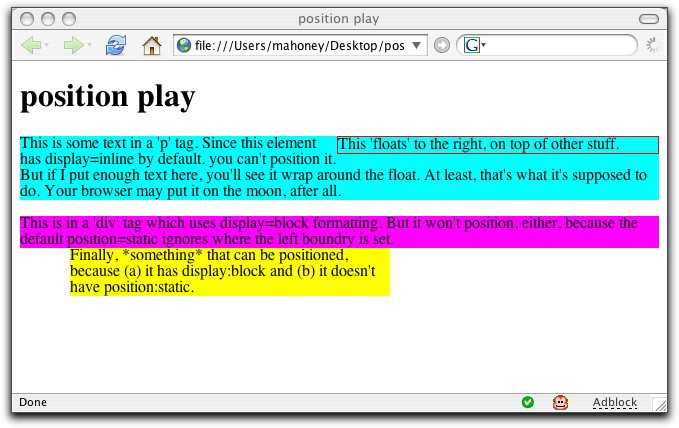
I've put together an example that might help, which includes several div tags that can't be positioned (I set left:50px for three elements, but only one moves.) See
the page,
the source, and
a screenshot. - Jim yet again
Thanks Jim, It might be easier to show you the trouble I'm having when I get to class on Friday. Basically, everything looks ok, but if I were to remove my style sheet, the document would not flow in the correct order. In other words, the design has two columns. The main column which takes up 2/3 of the page sits on the left. The right column takes up the remaining space. In order for me to get the right column to float properly, I had to put it above my main content on my XHTML doc. So, if the user viewed my page with CSS disabled the document would not be structured properly. Anyways, I'll show you on Friday and you can tell me what you think. -Nate 10/18 9:30am
OK Nate. I think that the simple answer is that your situation isn't unusual - it's nice to have things 'degrade gracefully' without a stylesheet, but you may not be able to easily order it the way you'd like. Probably you just live with that. Otherwise, I'd expect you'd need to either (a) use a different positioning model, such as float the main content to the left rather than the menu to the right, or (b) do some conditional stylesheet tricks using (say) javascript browser sniffing. As I said, probably just living with it is best: most people these days do have CSS, and without it at least all the content is there ... if not in the order you'd like. - Jim
I've updated the
roster page with photos of nearly everyone - except Tony, who's picture Kathy didn't have. So Tony, if you want to join the gallery, send me a picture of your head. (These photos are only visible to folks who've logged into the course.)
And I've fixed a typo on the assignments page; the next assignment was listed as due Tue Oct 24 ... when it as I said in class and has been our pattern, due this Friday, Oct 20.
- Jim
Hello,
My guess about the designer's layout choice is that he is trying to fit as many links as possible on a page. It makes it look grandiose to have a ton of links. For fun, I just tested the page and it failed with 27 XHTML errors. That makes me feel better. However, the CSS test passed!
I have had some of the same problems that you have had Nate with positioning. The hardest one for me was trying to create a 3 column layout without tables. Initially it worked but when I added content, I got one column that would be longer than the other. The length difference looks obvious when the columns have color. So I went to plan B, a different layout that is more of a box style with two columns.
-Selena