math on wiki pages
the currently recommended way
Just put your LaTeX between backslash parens (e.g. �\ ( ... \ ) for inline math) or backslash square brackets (e.g. \ [ ... \ ] for separate line) without a space after the backslash.
Here an inline example : \( \frac{\alpha}{1+\infty} \).
And here's a separate line example :
\[ \int_0^1 sin(x) \, dx \]
Indented (codeblock) lines do not go through the MathJax engine,
so the source for the formulas above look like this.
  \( \frac{\alpha}{1+\infty} \)
  \[ \int_0^1 sin(x) \, dx \]
Questions? Ask Jim Mahoney.
the old way
testing the < math > tag
Some formulas are displayed with HTML.
(The top line has extra spaces in the math tag
to keep it from doing its thing and leave TeX is visible.)
 < math > y = \gamma + \beta < /math >
 y = γ + β
Others will display with a png image.
In either case, the software should do the
right thing automatically.
< math >x = \frac{-b \pm \sqrt{b^2 - 4ca}}{2a}< /math >
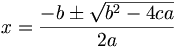
If you'd like to force the png image version,
perhaps because you don't like the way
the html formatting looks, you can put
the word "img" within the first math tag, e.g.
< math img > y = \gamma + \beta < /math >

other ways
There are a few other ways to input other characters, too:
HTML special symbols (e.g. "& alpha ;" without
the spaces and utf-8 characters. How this shows up
for you will depend on your browser and available fonts.
Here's the lowercase greek alphabet in utf-8 character.
(I used the Mac "Show Keyboard Palette" under "Keyboard"
to type the characters.)
α β γ δ ε ζ η θ ι κλ μ ν ξο π ρ σ ς τ υ φ χ ψ ωϑ ϒ ϕ ϖ
Or using HTML symbols (e.g. "& alpha ;" without the spaces).
α β γ ...
or within individual math tags
α
β
γ
...
or all in one tag
αβγ
Is it true that
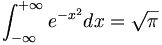
?
More testing.
sin(x) / x = f(x)
pre-superscript for sam ... using a "negative small space, positive small space" trick.




