feb 1
sound design - feb 1
an example of a sub patch and triggering
This illustrates a few ideas.
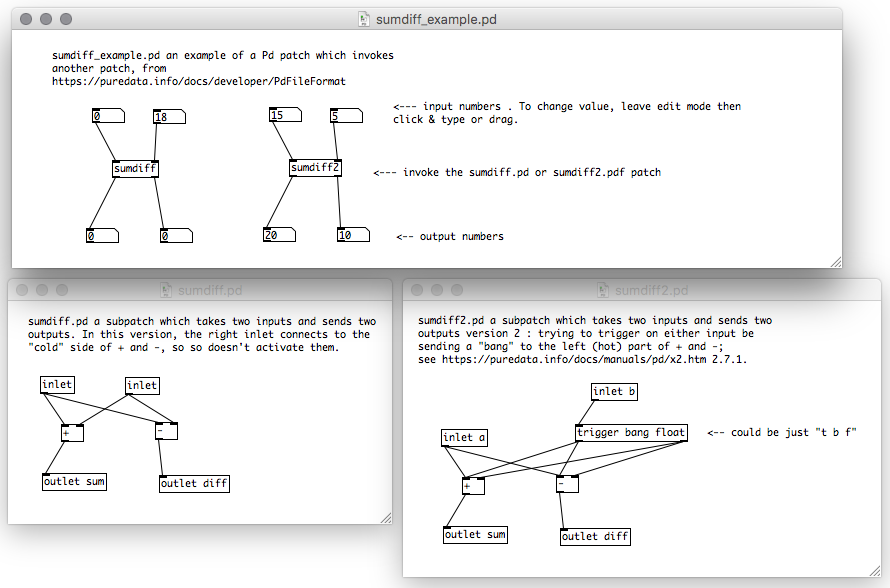
First, the subpatch_example.pd file "calls" the patches (i.e. functions) in the other files. The "inlet" boxes are the arguments passed into the patch, the "outlet" boxes are the return values.
In python one of these might look something like
 # --- sumdiff.py --
 def sumdiff(a, b):
   return (a+b, a-b)

 # -- sumdiff_example.py --
 from sumdiff import sumdiff
 (out1, out2) = sumdiff(20, 13)
 print out1, out2
The second idea that this example illustrates is "triggering".
Pd is an event-driven language, which means that it operates in terms of something happening ("being activated") when it receives a certain signal ("input").
Conceptually this means that a function like f(a,b) might have the issue that 'a' and 'b' might be seen as two different signals, and therefore might run f twice by when it should run once.
To address this concern, the normal Pd convention is that only changes to the top left input are treated as a "do this now" or "triggering" signal. And there are boxes in the language that will pack up multiple values and feed them to another box in a "right to left" order, so that the last one triggers it and runs the function. Their docs calls this "hot" and "cold" inputs.
In the first subdiff example, the [+] and [-] boxes within sumdiff act this way. Changing the right input to the patch doesn't change the output, until the left input is changed - then the numbers are updated correctly. Each tiny movement of the mouse or "return" that you type is another "trigger". The numbers in the picture look wrong because I changed the top right when all started as zero. The bottom ones didn't change.
If however you would like to have something where the user can manipulate either of several inputs, you can explicitly issue a "bang" (i.e. a trigger) to the left input. This means that the left left side of the [+] gets both a number (which is what it add) and possibly a "bang" which says "do this now". The [trigger bang float] box (which is just [t b f] in some of the patches I've seen) sends two outputs, a bang and a float, given one input (the float). In the subdiff2 one, changing either of the top inputs does the right thing.
Tricky ...
Lysha's Week:
- Nick and I met and drafted a tentative schedule with some notions of due dates and what sort of stuff we want to dig into. We both are mostly interested in musical applications, though I have some interest in visual stuff as well. Briefly, I think we both want to spend the weeks leading up to spring break doing practical examples/tutorials related to specific tasks/goals and then after the break mainly focus on putting together larger scale individual projects. In addition to midi implementation, I am also curious about using Pd as a generative tool for interacting with performers in improvisational settings.
- This week I have been mainly working on a random melody generator that triggers two different oscillators. I am curious about how to expand it so that it stays within a certain scale/range so that it is more musical, wondering about sub-patches and the like. I'll continue to try and develop this patch for class on Weds.
- I have also been tinkering around with opening/playing samples/files from the HD. I can play them using the [openpanel] object, but cannot understand where Pd looks for files, so as to be able to direct it to a sample without having to find it in the GUI. Have searched a good bit online but need some help understanding files/directories/etc and how this all happens behind the scenes. Similarly, wondering about the different ways to direct add-ons, as in what folders to store them in for use and such.
Jim responds
For where Pd looks for files, see
https://puredata.info/docs/manuals/pd/x3.htm#s5 .
You can set its default path (a list of folders where it looks for files including external patches and audio) with the Pd >> Preferences >> Path ... menu.
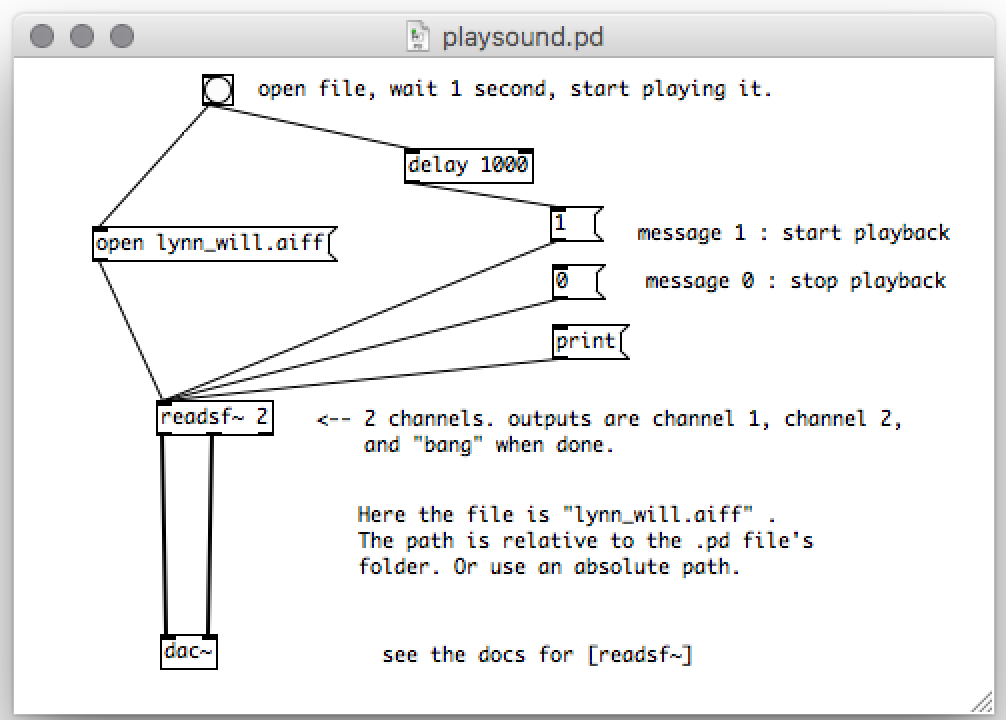
Looks like explicit file names are either (a) relative to the .pd script's folder (i.e. foo.aiff is in the same folder, ../foo.aiff is up one folder, ./audio/foo.aiff is in the audio folder below this one) or (b) absolute paths that start with (i.e. /Users/mahoney/Desktop/foo.aiff). These names go within a message box, without quotes.
Here's an example I put together from the help entry for [readsf~] , with playsound.pd and lynn_will.aiff in the same folder (my Desktop).
You can add extensions to Pd by downloading them with the Help >> Find Externals menu. Some of these as listed in
http://blazicek.net/list_of_pure_data_objects.html in the "Extended objects" category can do things like read all the files in a folder, things like [getdir] and [folder_list] . I expect this would for example let you read all the audio files in a given folder without naming them ahead of time.
installing extensions
 $ apt-get install puredata
 $ apt-get install pd-*
including pd-extended
nick's notes for next time
- pick two techniques and play with them
- manipulate white noise/samples?

![[paper clip]](/courses/source/wiki_images/paper_clip_tilt.png)
 name last modified size
