StackIntro
This section provides an introduction to the network protocol stack, a look at its top layer, and a taste of things to come. It acts as a prerequisite for the rest of the networking theory section of the course. **An important note**: the terms "internet" and "world wide web" are often used interchangeably. This is incorrect. The world wide web refers specifically to the vast collection of web pages and traffic which exist on the internet. The internet includes the entire network of connected computers and devices.
Contents
- Protocol Stack
- Basic Theory
- OSI vs. TCP/IP Protocol Model
- The Application Layer
- Using telnet To Connect To A Website
Protocol Stack
Basic Theory
A protocol is simply a procedure for a specified task. They appear everywhere in our daily lives from how to drive to work to how to use proper manners. On some level they can all be described with "state diagrams". At any given moment, the protocol exist in a single state, where it remains until receiving a stimulus to move it to a different one. For example, if I'm sitting in a room and you join me, good manners dictates we shake hands or exchange greetings of some form.
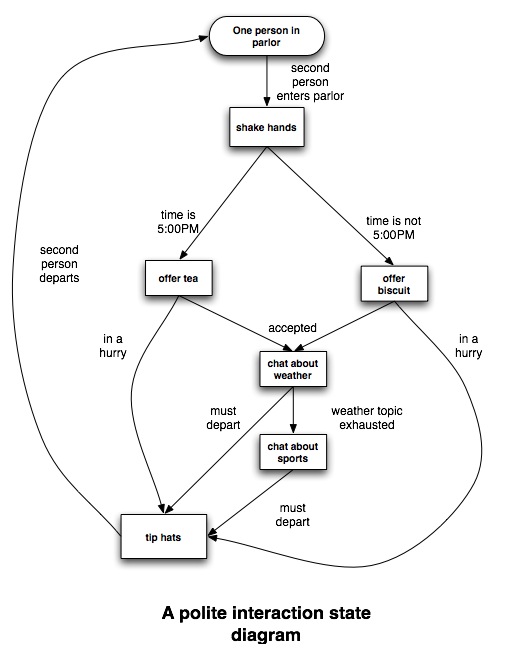
A protocol is not a description of *how* to perform an action, but rather what the action should be. An
implementation of a protocol would actually specify what angle at which to tip your hat or how much pressure to apply in a handshake. Continuing our analogy, it should be clear that even if each person's implementation of the manners protocol is different, the protocol will still function. By using a protocol rather than a rigidly defined implementation for computer networking, we create compatibility between many different operating systems and hardware architectures.
The network protocol stack divides the task of communicating between two computers into discrete subtasks, or layers, with a unique protocol to handle each. Most of the layers don't even require a specific protocol, just so long as it accomplishes the task assigned to it. When data is transmitted, it passes up and down the stack, without skipping any layers, i.e. if it is on the second layer, it can be passed up to the third or down to the first, but not directly to the fourth or fifth. While data is passed between layers, layers only communicate with equivalent layers. We can think of this as it is generally implemented in terms of encapsulation.
As an analogy to the network protocol stack, take the classic example of another protocol stack: good old fashioned snail mail. If Bob wants to write a letter to Alice, he first uses a letter writing protocol, adhering to things like starting the letter with "Dear Alice," and concluding it with "Your friend, Bob". He then wraps the letter in an envelope that says "I should be delivered to Alice's house", a second protocol. Of course the letter doesn't specify *how* to get to Alice's house --that's a job for more protocols, which specify what route to take, what vehicle to transport the letter, etc. Finally the letter arrives at Alice's house, where it is passed off to Alice. Abstractly, we can interpret this as Bob and Alice communicating with each other, Bob's house and Alice's house communicating with each other, and postal branches, employees, etc. doing the same, each layer operating independently of the others.
OSI vs. TCP/IP Protocol Model
There are two protocol stack models in common use today, which are similar but not equivalent. The internet protocol suite, or TCP/IP protocol suite, has five layers. The top, layer five, is the application layer, which as the name suggests handles communication between applications. The fourth layer is the transport layer, which handles communication between computers. Third is the network layer, which deals with determining and transmitting data between "hops" en route to its destination. Second is the link layer, which handles communication between network interfaces, such as ethernet or wireless cards. Finally at the bottom is layer one, the physical layer, which is the actual physical medium data is passed over. This could be ethernet cables, fiberoptics, radio waves, or even smoke signals if we so desired. Originally the physical layer was not included in the suite, and some sources still consider this protocol suite as four-layered, but it is important to include discussion of all aspects of networking, so we will include it.
The OSI (Open Systems Interconnection) protocol suite is divided up into seven layers. Layers one through four are roughly equivalent to their respective layers in the internet protocol suite, and are named identically. Layers five through seven are the session, presentation, and application layers, respectively. The internet as we know it is built on the IP model. It has been argued that the OSI model is more powerful than the IP, but the technicalities of switching make its widespread acceptance nearly impossible. From here on out, we will be looking solely at the five layer IP model. For more information on both models, read [1] and [2].
The Application Layer
An application layer protocol can be the simplest of the stack to implement or the most complex, depending on the application. The protocol is generally implemented within the communicating application itself, and need contain as many or as few states as needed.
For example, if we want a simple chat application that passes text between two users, we need only pass along the text in each respective application layer. For a trivial example written in Perl, see
insecure-chat.pl. If however we're designing a protocol for a massive multiplayer game, the protocol may need to be much more complex.
When writing a network application, we rely almost entirely on built-in implementations for the lower three levels. Generally we specify a transport layer protocol to pass our data off to, and an IP address for the destination, but otherwise we don't worry about the details.
Using Telnet To Connect To A Website
As we've shown, implementation is irrelevant as long as the protocol is followed. To demonstrate this on the application layer, let's take a look at HTTP --Hypertext Transfer Protocol --the protocol used for web traffic. Normally we would just enter an address in our favorite web browser and enjoy the results, but let's try a more hands-on approach to web surfing.
Telnet is a simple standard networking utility that allows you to communicate with a specified address on a specified port (we'll explain what that means later). Essentially what this lets us do is bypass the application layer. If we type messages following an expected protocol, the results should be the same as with our browser. So say we want to view www.google.com. Web traffic is received on port 80 by default, so to initiate our connection, we type
 $ telnet www.google.com 80
 Trying 72.14.205.99...
 Connected to www.l.google.com.
 Escape character is '^]'.
We then type an HTTP request to "get" the webpage at the webserver's root directory, specifying that we are using HTTP version 1.1:
GET / HTTP/1.1
www.google.com then responds with an HTTP header that looks like
 HTTP/1.1 200 OK
 Cache-Control: private
 Content-Type: text/html
 Set-Cookie: PREF=ID=10a6bf55a5a0bbec:TM=1165292732:LM=1165292732:S=-s9rukYT5VmliGFD;
   expires=Sun, 17-Jan-2038 19:14:07 GMT; path=/; domain=.google.com
 Server: GWS/2.1
 Transfer-Encoding: chunked
 Date: Tue, 05 Dec 2006 04:25:32 GMT
and then the source for the webpage. This source is the same code we'd get if we chose "view source" in our browser, it just hasn't been formatted or interpreted. Are we having fun yet?
Sources and Further Reading

