Microcontrollers do many things. A microcontroller ...
 An Arduino Uno
The Arduino is designed to work right out of the box. It has its own development environment and has a number of readily working examples that can be uploaded to the chip easily (by way of the Arduino's included USB chip). The Arduino is an easy interface to the ATmega328 brain of the board. The whole board plugs into USB and All of the inputs and outputs are broken out for easy access. There are included on-board LEDs to tell the status of the serial connections and whether or not the board is powered.
I began working with microcontrollers under the Arduino environment. I started using smaller standalone chips when it was apparent that I didn't need the full power of the chip to run the simple devices I was making and that I didn't have the money to buy ten Arduinos. The arduino certainly has its place. If you want to make something that works and make it work quickly, the Arduino is your board. Due to its incredible user-friendliness and effectiveness, it has an incredible number of libraries and a thriving community around it. Someone with barely any previous electronic knowledge or programming experience can pick up an arduino and get an LED blinking in a number of minutes.
The ATtiny85
 (the ATtiny25, 45 and 85 differ only in amount of internal memory. I will refer only to the ATtiny85 for the rest of this document)
The ATtiny85 is a substantially smaller microcontroller(tiny not mega). It has only a fraction of the computing power of the ATmega328 brain of the Arduino. Its advantage is in its overall low power consumption, and cost effectiveness. It has fewer input and output pins. It is still a fully functional, albeit small, computer. Do not let its small size fool you, it is still quite powerful. Did I mention it's really cheap?
This guide will focus on getting someone on their feet and making interesting things(with less of the wild fumbling of my own experience).
Should I use a microcontroller?
If so, what is appropriate?
Object 1:
I want to make something that blinks off and on when I cast a shadow over it.
Answer:
This should be relatively easy. Microcontrollers are great for things that don't require too much processing power and take a few simple inputs and ouputs. You could even make a whole bunch of these objects for relatively cheaply once you have the circuit figured out.
Verdict: use a small microcontroller such as the ATtiny85.
Object 2:
I want to make a device that controls the outputs of six different waveforms at the same time at a high bitrate.
.
Answer:
No, probably not. In software alone, microcontrollers aren't terribly powerful. You're probably better off trying to take inputs from the microcontroller and then pipe the values of your sensors through a serial connection to a computer. Using an Arduino for input is probably your best bet if you just need something to work. It's relatively easy to use the microcontroller as an input device and send commands to the computer The computer is better equipped to do the heavy lifting of sound production. (See
bend sensor project)
Verdict: Use an arduino for Input and let something with more power do the heavy lifting (a computer running
processing).
Object 3:
I want to make an LED blink off and on in a certain pattern. An Arduino should work, right?
Using an Arduino to make an LED blink off and on is kind of like using a bulldozer to build a sand castle. You're probably better off using something smaller and cheaper. If the LED isn't blinking in too complex of a pattern, you might be better off trying discrete components (examples:
1,
2 or
3). Arduinos run about $30.00 a board. An ATtiny (specifically the ATtiny25/45/85 series) may be more what you are looking for at >=$2.00 a chip, less if you buy in
bulk. If you wanted to make more than one of these objects, we're talking an order of magnitude in price difference between the arduino and a similar circuit prototyped on an ATtiny85.
Verdict: Use either an ATtiny or other inexpensive microcontroller if the pattern is complex or a 555 chip if the circuit is simpler.
Why the ATtiny:
I chose this chip because it was powerful and inexpensive and could be used to make multiple small experimental devices with a significantly lower cost than the Arduino.
For the purposes of this guide, I will only be explaining how to use an ATtiny85 and the kind of devices explained in Object 3: small and relatively simple.
Where I'm going with all of this:
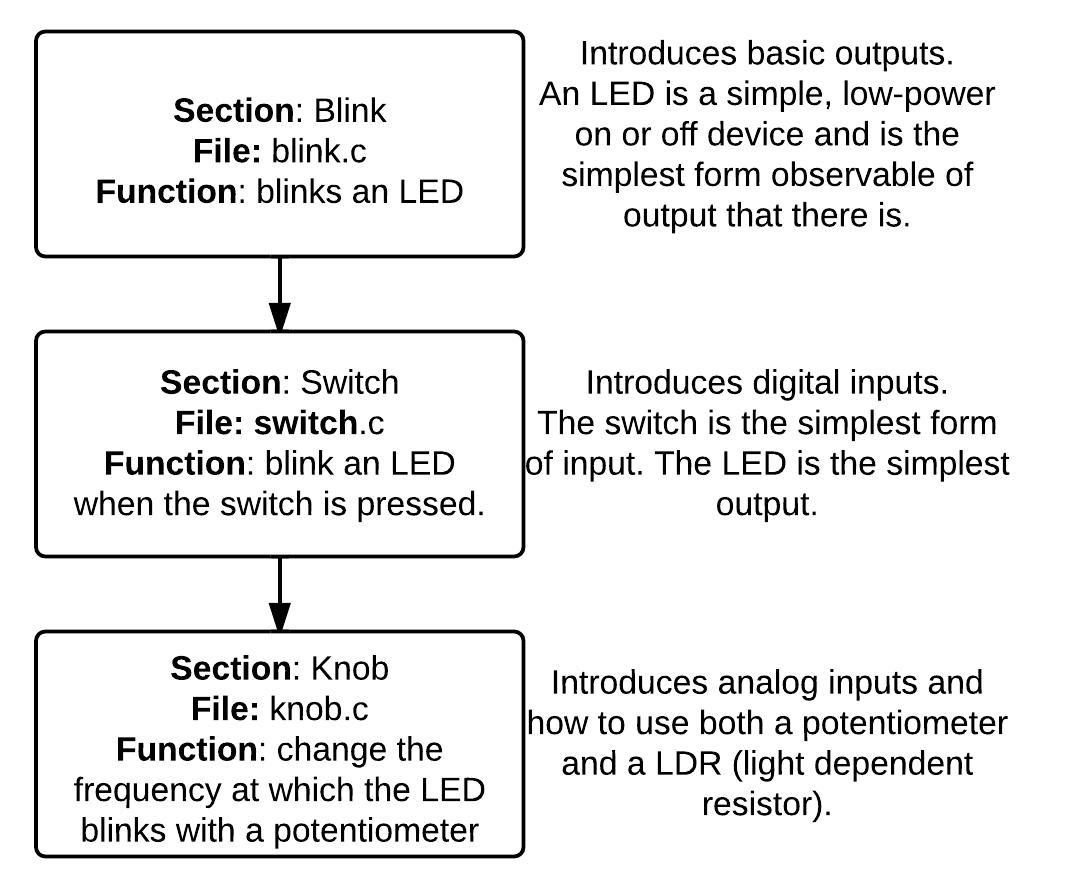
This will be structured in the form of small segments that explain a handful of related topics that in turn can be used to create more complex and interesting objects:
- turning on an LED or low voltage device:
- this can be extended to transistors and buzzers for higher power devices
- reading inputs from switches:
- multiple switches can be hooked up to create elaborate input-output schemes. (an ATtiny version of my eyebrow controller)
- by pairing an input from an LDR with output to a buzzer, we can make some (arguably) wonderful noises. (see dark-bug)
- reading analog inputs from a potentiometer or LDR:
- can be paired together to create an input that has an adjustable light threshold.
Next up:
The next section will cover the bare minimum of hardware needed to program one of these chips.
|
back |
home |
next |
introduction |
hardware |
adapter |
software |
datasheet |
registers |
blink |
switch |
knob |
things |
|


![[paper clip]](/courses/source/wiki_images/paper_clip_tilt.png)
 name last modified size
